
Logging out with sign-offs pending
What the warning means when you log out with unfinished sign-offs.
What this page is for
After you press Sign off, the sign-off waits 5 seconds so you can undo it. If you press Log out during those 5 seconds, the Mentor Console saves the waiting sign-off first. If it cannot save it, it keeps you signed in and tells you, so no sign-off is lost without you knowing.
- Where
- Account menu, in the header of every Mentor Console page
- Who can open it
- Mentors
- App
- Mentor Console
What Log out does with a waiting sign-off
The same steps as a list
- Press Sign off on a row
- Press Log out before the 5 seconds end
- Sends the waiting sign-offs now
- Did every sign-off save? (Yes: Signs you out and shows the sign-in page; No: Keeps you signed in, puts the row back and warns you)
- Signs you out and shows the sign-in page
- Keeps you signed in, puts the row back and warns you
The screen
Log out is in the Account menu, at the top right of every page.
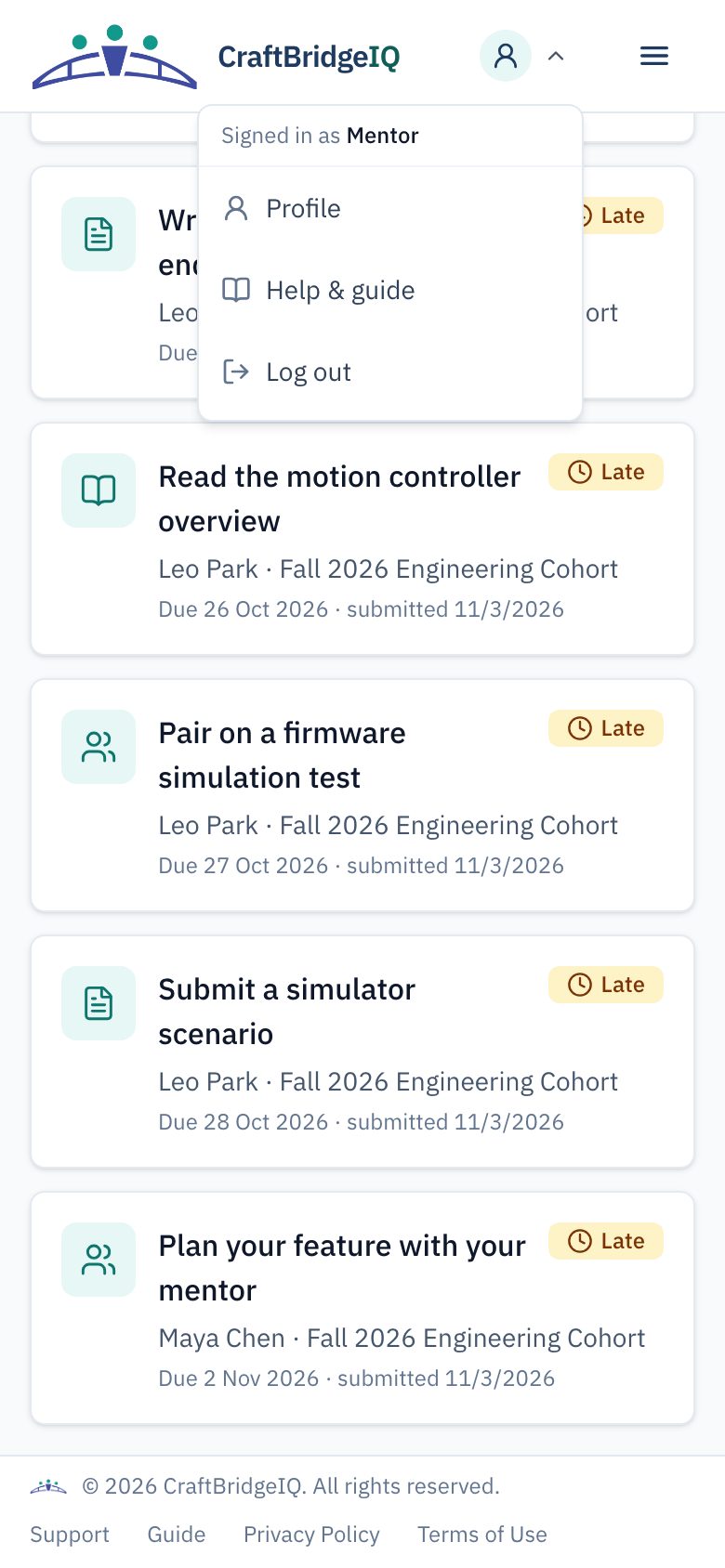
| No. | Control | What it does | What happens next |
|---|---|---|---|
| 1 | Account menu | Opens the menu. It shows Signed in as and your role, then Profile, Help & guide and Log out. | Help & guide opens this guide in a new tab. |
| 2 | Log out | Signs you out. It reads Logging out… while it works, and then sends you to the sign-in page. | If a sign-off is waiting, it is saved first. If it cannot be saved you stay signed in. |
When a waiting sign-off cannot be saved, a red message tells you.
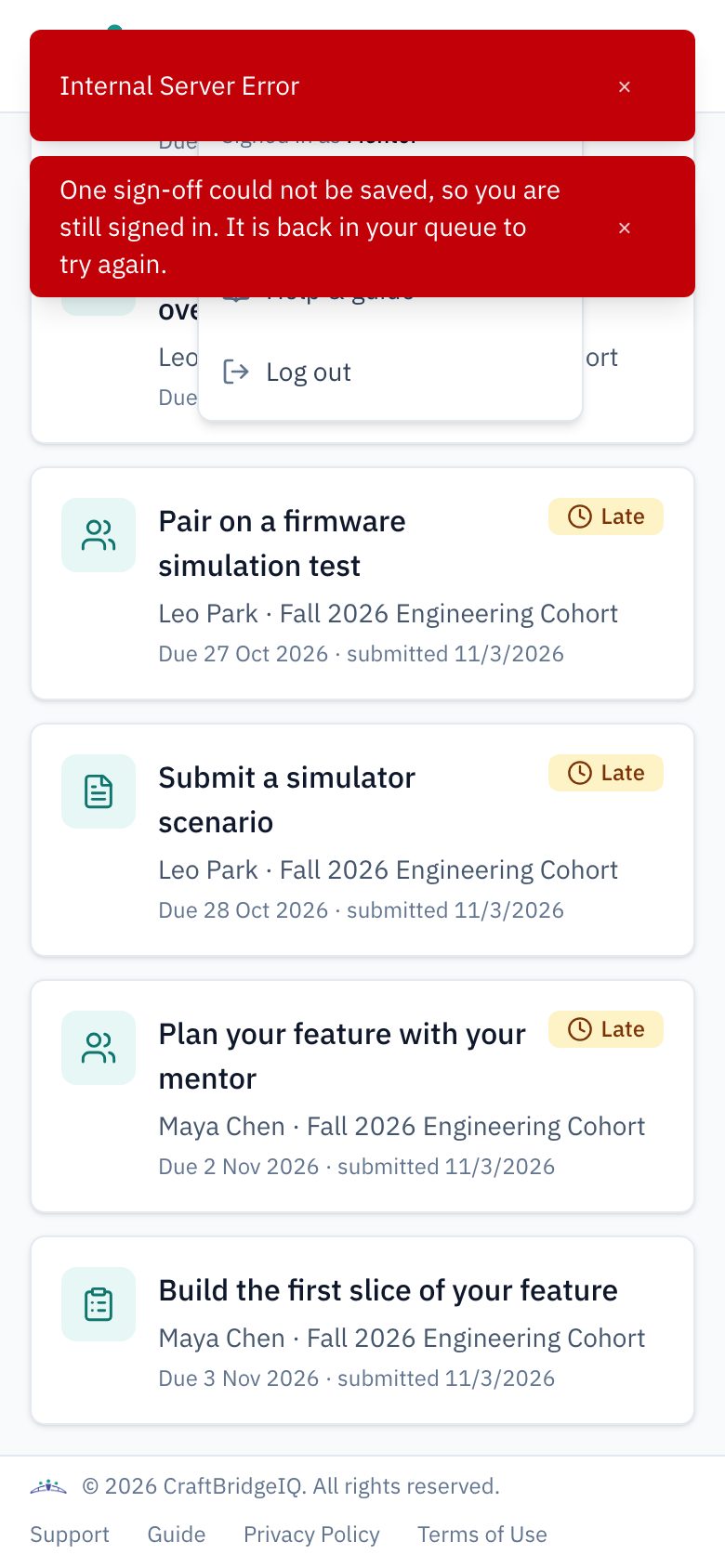
| No. | Control | What it does | What happens next |
|---|---|---|---|
| 3 | One sign-off could not be saved, so you are still signed in. It is back in your queue to try again. | A red message at the top of the screen. With several waiting sign-offs it says how many could not be saved. | Open the row and sign it off again. |
| 4 | Build the first slice of your feature | The row of the sign-off that did not save, back in your queue. | Tap it to review and sign off again. |
| Dismiss | The cross on a message. It hides the message only. It does not cancel a waiting sign-off. | Nothing else changes. |
A second red message can appear above it, giving the reason the server gave for the failure. The row also comes back for that reason.
Step by step
Log out when nothing is waiting
- Open the Account menu.
- Press Log out.
You are signed out and the sign-in page opens.
Log out while a sign-off is waiting
- Sign off a row.
- Open the Account menu and press Log out. If the Undo message covers the menu button, press its cross first.
- Wait for Logging out… to finish.
The waiting sign-off is saved and cannot be undone any more, then you are signed out.
Read the warning and try again
- Read the red message. It says you are still signed in.
- Find the row in your queue. It is back where it belongs.
- Open it and press Sign off again.
- Press Log out again when you are ready.
Messages you can see
| Message | When you see it | What to do |
|---|---|---|
| One sign-off could not be saved, so you are still signed in. It is back in your queue to try again. | You pressed Log out and one waiting sign-off could not be saved. | Sign the row off again, then log out. |
| sign-offs could not be saved, so you are still signed in. They are back in your queue to try again. | You pressed Log out and several waiting sign-offs could not be saved. The message starts with how many. | Sign each row off again, then log out. |
| Logging out… | On the Log out item while the waiting sign-offs are saved. | Wait. |
| Too late to undo | You press Undo after the 5 seconds, or after Log out has already saved the sign-off. The full text ends with: already signed off. | Nothing. The sign-off is saved. |
| Sign-off failed | A second red message, when the server gave no reason. It ends with: try again. | Sign the row off again. |
Limits and other roles
- The undo window is 5 seconds.
- On a phone the Undo message sits over the Account menu button for those 5 seconds. Press the cross on the message to reach the button.
- The same saving happens if you leave the page, lock your phone or switch apps during the 5 seconds.
Common questions
Can a sign-off be lost when I log out?
No. Either it is saved and you are signed out, or it is not saved and you stay signed in with the row back in your queue and a warning.
Can I still undo after pressing Log out?
No. Pressing Log out saves the waiting sign-off straight away, so the undo window ends.
I cannot reach the Account menu button.
On a phone the Undo message covers it. Press the cross on the message, or wait 5 seconds for it to go away. After the 5 seconds the sign-off is saved by itself.
Last checked 2026-11-03 against the product.