
People: interns and mentors
The Interns and Mentors pages: filter, sort, group and export interns by cohort.
What this page is for
The People menu has two pages. Interns shows every active intern with their cohort, mentor, pace, weeks and rating, and lets you filter, sort, group and export by cohort. Mentors shows every mentor with how many interns they carry, the reviews waiting for them and their anonymous rating, and is where you assign mentors. Press a name to open that person’s own page.
- Where
- People menu, then Interns (address /people/interns) or Mentors (address /people/mentors)
- Who can open it
- Administrators and view-only support logins
- App
- Program Studio
How to find a person
The same steps as a list
- Open the People menu
- Intern or mentor? (Intern: Interns: pick a cohort, search or sort; Mentor: Mentors: search by name)
- Interns: pick a cohort, search or sort
- Mentors: search by name
- Press the name to open their page
The screen
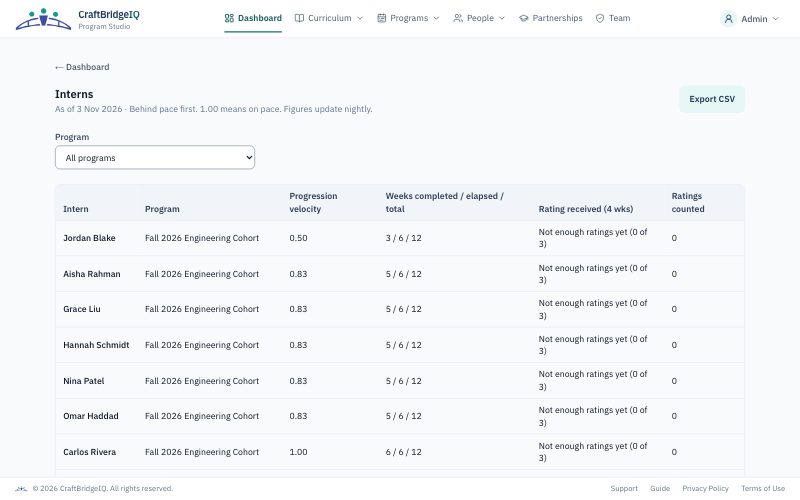
| No. | Control | What it does | What happens next |
|---|---|---|---|
| Interns | The heading of the Interns page (address /people/interns). It lists interns only. | Nothing; it is a label. To see mentors, choose Mentors in the People menu. | |
| Mentors | The heading of the Mentors page (address /people/mentors). It lists mentors only. | Nothing; it is a label. To see interns, choose Interns in the People menu. | |
| Cohort | On the Interns page, picks All cohorts or one cohort. | The table reloads and the address changes to match, so you can bookmark it. With one cohort picked the Cohort column is hidden. | |
| Search by name or email | Narrows the page to people whose name or email contains what you type. | The table updates as you type. Search is not kept in the address. | |
| Group by cohort | On the Interns page, splits the table into one section per cohort, A to Z, each headed with how many interns it has and how many are at risk or behind. | The sort still applies inside each cohort. The choice is kept in the address. | |
| Column headings | Every Interns column heading is a button: Intern, Cohort, Mentor, Pace, Weeks and Rating. An arrow next to the sorted column shows its direction. | A new column sorts A to Z or lowest first; pressing it again reverses. Interns without a value (no pace yet, no mentor, a hidden rating) always go last. | |
| Export CSV | Saves exactly the interns on screen, in the order shown: your cohort, search, sort and grouping all apply. On the Mentors page it saves the mentors' nightly figures. | Your browser downloads a file named interns (or interns- and the cohort name), then the snapshot date, ending in .csv. | |
| Assign mentors | On the Mentors page, opens Assign mentors to give an intern a mentor or change one. | Opens Assign mentors. |
The Interns page columns:
| No. | Control | What it does | What happens next |
|---|---|---|---|
| Intern | The intern's name, with their email under it. | Press the name to open the intern's page. | |
| Cohort | The intern's cohort. Only shown while All cohorts is picked and the table is not grouped. | Nothing. | |
| Mentor | The intern's current primary mentor. | Reads Not assigned when there is none. | |
| Pace | A badge (Ahead above 1.10, On pace 0.90 to 1.10, Behind 0.60 to 0.90, At risk below 0.60, or No pace yet before a week has ended) and the velocity: weeks completed divided by weeks elapsed. | The list starts sorted by pace, furthest behind first. | |
| Weeks completed / elapsed / total | Three numbers, for example 3 / 6 / 12. | A dash for a number the snapshot does not have yet. | |
| Rating received (4 wks) | The average rating the intern's mentor gave them in the last 4 weeks. | Reads Not enough ratings yet (n of 3) until 3 or more ratings are in. |
The Mentors page:
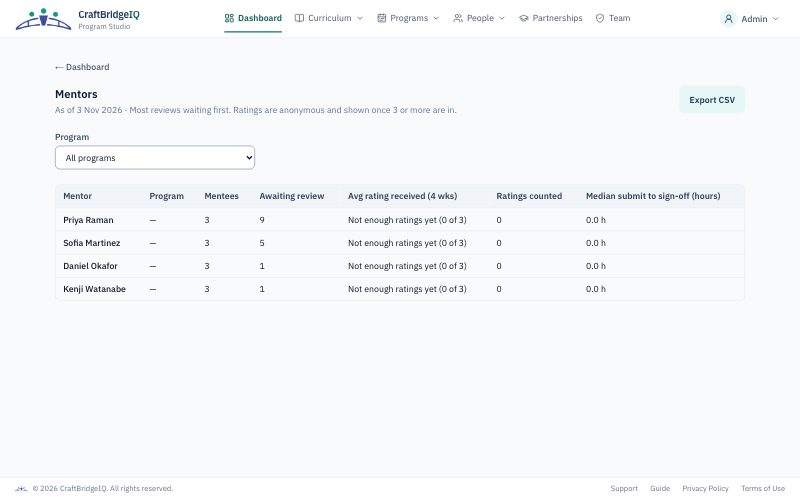
| No. | Control | What it does | What happens next |
|---|---|---|---|
| Mentor | The mentor's name, with their email under it. | Press the name to open the mentor's page. | |
| Interns (of capacity) | How many interns the mentor has now, out of the most they can take, for example 2 of 3. | Nothing. | |
| New interns | Accepting or Not accepting, from the mentor's profile. | A mentor who is not accepting is not offered for new interns on Assign mentors. | |
| Awaiting review | Submitted assignments the mentor has not reviewed yet, from the nightly snapshot. | Mentors with the most come first. | |
| Median submit to sign-off | The middle time between submitting and sign-off for this mentor's interns, last 28 days. | Shown as hours, for example 18.5 h. | |
| Avg rating received (4 wks) | The average rating interns gave the mentor in the last 4 weeks. Anonymous. | Reads Not enough ratings yet (n of 3) until 3 or more different interns have rated. |
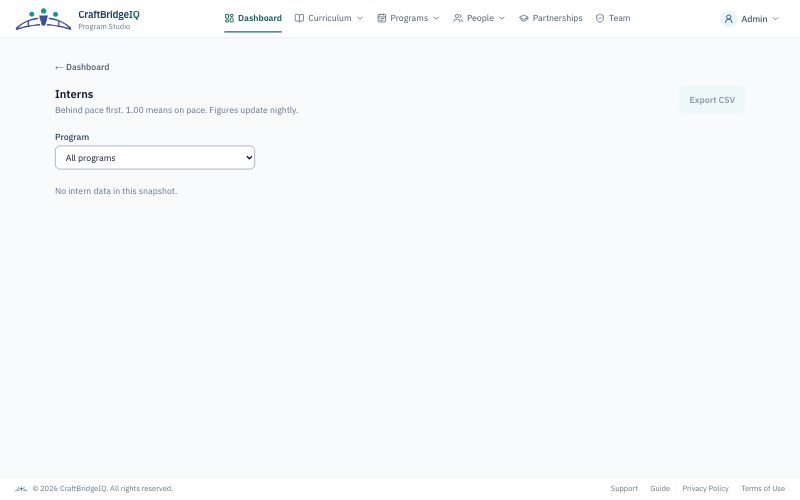
When there is nobody to list, the table is replaced by a short message:
Step by step
Open an intern's page
- Open People, then Interns.
- Pick a cohort, or type part of the intern’s name in Search by name or email.
- Press the intern’s name.
The intern’s page shows their program, dates and mentor, their progress from the nightly snapshot, every assignment week by week, their competencies and their check-ins. An administrator can open the next week early from there.
Open a mentor's page
- Open People, then Mentors.
- Press the mentor’s name.
See A mentor's page.
Sort and group interns by cohort
- Open People, then Interns.
- Press a column heading, for example Cohort or Pace. Press it again to reverse the order.
- Tick Group by cohort to see one section per cohort.
Save interns as a spreadsheet
- Pick a cohort, search, sort or group until the table shows the interns you want.
- Press Export CSV at the top right of the table.
- Open the downloaded file in your spreadsheet program.
The file has the same interns in the same order, with their email, cohort, mentor, status, pace and figures. A rating that is hidden on screen is left blank in the file.
Assign a mentor
- Open People, then Mentors.
- Press Assign mentors.
See Assigning mentors.
Messages you can see
| Message | When you see it | What to do |
|---|---|---|
| No interns yet | Nobody is enrolled in the program you picked, or in any program. | Add interns from a program's roster. |
| No intern matches that search. | Nobody's name or email contains what you typed. | Shorten or clear the search. |
| No mentor matches that search. | No mentor's name or email contains what you typed. | Shorten or clear the search. |
| No mentor profiles yet | Nobody in your company has a mentor profile. | Profiles appear for people given the mentor role. |
| Couldn't load the interns. | The Interns page could not load. The server's own short message is shown instead when it sent one. | Press Try again. |
| Couldn't load pace and ratings. | The names loaded but the nightly figures did not. | Press Try again. |
| Couldn't load mentor profiles. | The Mentors page could not load. | Press Try again. |
| Couldn't load the program picker. | The list of cohorts could not load. | Press Try again. |
| Couldn't load this intern. | An intern's page could not load, or the intern is not in your company. | Go back and try again. |
| Not enough ratings yet (1 of 3) | In a rating cell when fewer than 3 ratings are in. | Nothing. The average appears once 3 are in. |
Limits and other roles
- The Interns page lists active interns. Names, programs and mentors are live; pace, weeks and ratings are from the nightly snapshot.
- A rating average is shown only when 3 or more ratings are behind it.
- Mentor figures are company-wide, so the Mentors page has no Cohort picker.
Common questions
Where did View all go?
The dashboard no longer has intern and mentor tables, so there is nothing to expand. Every intern and mentor is listed here, and the old /dashboard/interns, /dashboard/mentors, /mentors and /people addresses open these pages.
Why is a new intern shown with No pace yet?
Pace comes from the nightly snapshot and needs at least one finished week. A new intern is listed straight away and gets a pace once a week has ended.
Can I bookmark a cohort or a sort?
Yes. The page, the cohort, the sort and Group by cohort are all part of the address. An address with a damaged part falls back to the default: all cohorts, sorted by pace, not grouped.
Last checked 2026-11-03 against the product.