
Organisations
Find every company and university and open one.
What this page is for
Organisations is the first page you see in the Admin Console. It lists every company and every university on CraftbridgeIQ, so you can check who is set up, who is still waiting for their administrator, and open any one to change it. You cannot change anything on this page itself; every change happens on the organisation’s own page.
- Where
- Organisations, the first item in the top menu (address /)
- Who can open it
- CraftBridge staff with the role Platform admin
- App
- Admin Console
How to find an organisation
The same steps as a list
- Open Organisations
- Choose Companies or Universities
- Lists that kind, 25 at a time
- Is it in the list? (Yes: Click its name to open it; No: Press Load more)
- Press Load more
- Click its name to open it
The screen
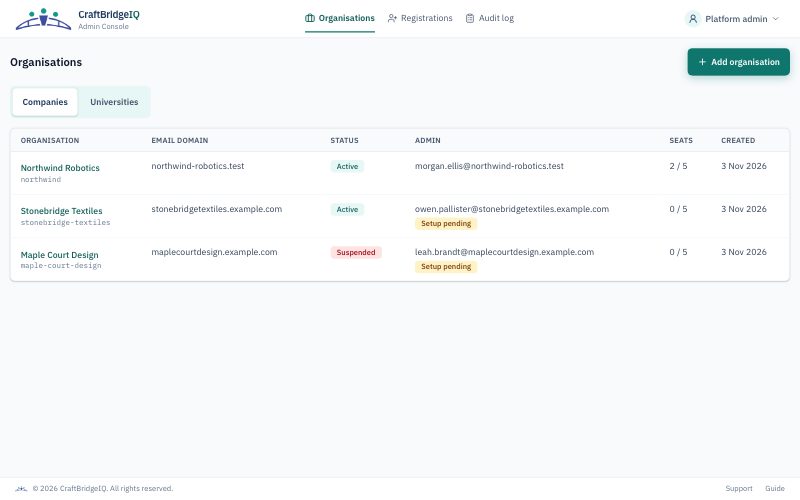
| No. | Control | What it does | What happens next |
|---|---|---|---|
| 1 | Organisations | The page heading. It is also the first link in the top menu, next to Registrations and Audit log. | Nothing; it is a label. |
| 2 | Add organisation | Opens the form for a new company or university. It opens with the tab you are on already chosen. | The Add organisation form opens. |
| 3 | Companies | Shows the companies. | The table lists companies. The address has no kind in it. |
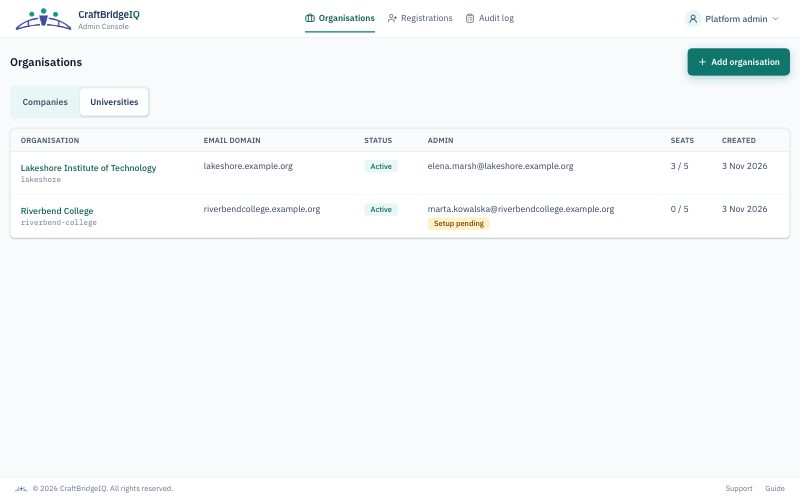
| 4 | Universities | Shows the universities. | The table lists universities. The address gains kind=institution, so Back from an organisation returns to this tab. |
| 5 | Organisation | The organisation's name and, in smaller type, its slug. The name is a link to its page. | Opens that organisation's page. |
| 6 | Status | Active or Suspended. A suspended organisation's people cannot sign in. | Nothing; it is a label. |
| 7 | Setup pending | A badge under the administrator's email while that person has not yet chosen a password. | Open the organisation to send the setup email again. |
| 8 | Seats | Support logins in use, a slash, then the limit, for example 2 / 5. | Nothing; it is a label. Change the limit on the organisation's page. |
The table has two more columns. Email domain is the domain every login of that organisation must use, or No domain yet when none is set. Admin is the first administrator’s email, or No admin. Created is the date the organisation was added.
The Universities tab shows the same table for universities:
Step by step
Open an organisation
- Open Organisations in the top menu.
- Choose Companies or Universities.
- Find the name in the Organisation column.
- Click the name.
See more organisations
- Scroll to the end of the table.
- Press Load more. It reads Loading... while it works.
The button appears only when there are more organisations than are on screen. Each press adds up to 25 more.
Find organisations waiting for their administrator
- Look down the Admin column for the Setup pending badge.
- Click that organisation’s name.
- Send the setup email again from its page. See One organisation.
Messages you can see
| Message | When you see it | What to do |
|---|---|---|
| No companies yet | The chosen tab has no organisations. It reads No universities yet on the other tab. | Press Add organisation. |
| Add the first company to get it set up. | Under the empty message. | Press Add organisation. |
| Couldn't load the organisations. | The list could not load. | Press the retry button shown with it. |
| Couldn't load more organisations. | Load more failed. | Press the retry button shown with it. |
| No domain yet | In the Email domain column for an organisation with no domain. | Open the organisation and set one. |
| No admin | In the Admin column for an organisation with no administrator. | Open the organisation to see its details. |
Limits and other roles
- The table shows 25 organisations at a time. Press Load more for the next 25.
- The page is read-only. It never changes an organisation.
Common questions
What does 0 / 5 mean in Seats?
The organisation has no support logins yet, out of the 5 it is allowed. Raise or lower the limit on the organisation’s page. See One organisation.
Why do I not see a university in the list?
Universities are on their own tab. Press Universities above the table.
How do I add an organisation?
Press Add organisation. See Adding an organisation. Organisations that asked to join on their own are on Registration requests.
Last checked 2026-11-03 against the product.