
Holiday calendars
Choose the days a program skips.
What this page is for
A holiday calendar is a named list of days a program skips. When a program has a calendar, work that would fall on a holiday moves later instead of being dropped, so the program’s end date and schedule shift too. Use this page to create calendars and keep their holidays up to date. You choose which calendar a program uses on the program’s own page.
- Where
- Programs menu, then Holiday calendars (address /programs/calendars)
- Who can open it
- Administrators can create, edit and delete. A support login can open and read.
- App
- Program Studio
How a holiday calendar works
The same steps as a list
- Press New calendar and name it
- Add each holiday with a date and a label
- On a draft program, choose the calendar and press Update
- Moves work off the holidays and recalculates the end date
- The program's schedule skips those days
The screen
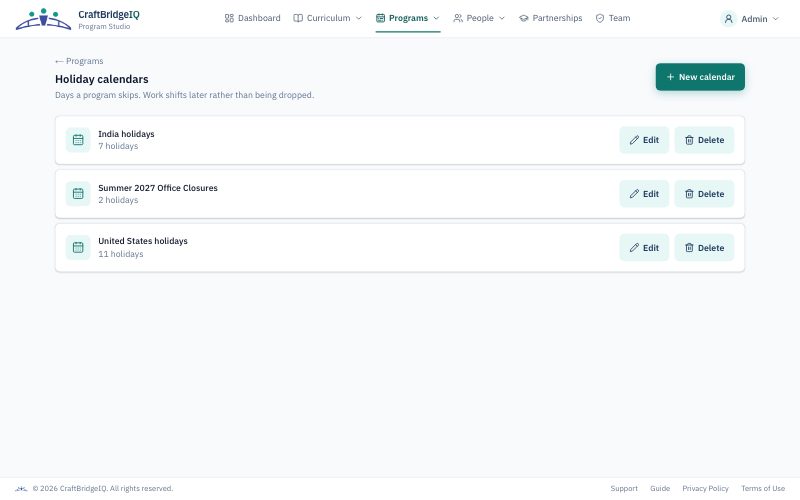
| No. | Control | What it does | What happens next |
|---|---|---|---|
| 1 | ← Programs | A link back to the list of programs. | You go to Programs. |
| 2 | Holiday calendars | The page heading. | Nothing; it is a label. |
| 3 | Days a program skips. Work shifts later rather than being dropped. | A one-line reminder of what a calendar does. | Nothing; it is a label. |
| 4 | New calendar | Opens the New holiday calendar box. | A box asks for a name. |
| 5 | Calendar name | The name of each calendar. One card per calendar. | Nothing; it is a label. |
| 6 | 2 holidays | How many holidays the calendar holds. It reads 1 holiday for one. | Nothing; it is a label. |
| 7 | Edit | Opens the calendar's holidays under its card. The button then reads Done. | You can add and remove holidays. |
| 8 | Delete | Deletes the calendar after the browser asks you to confirm. | The calendar is removed from the list. |
Press Edit and the card opens:
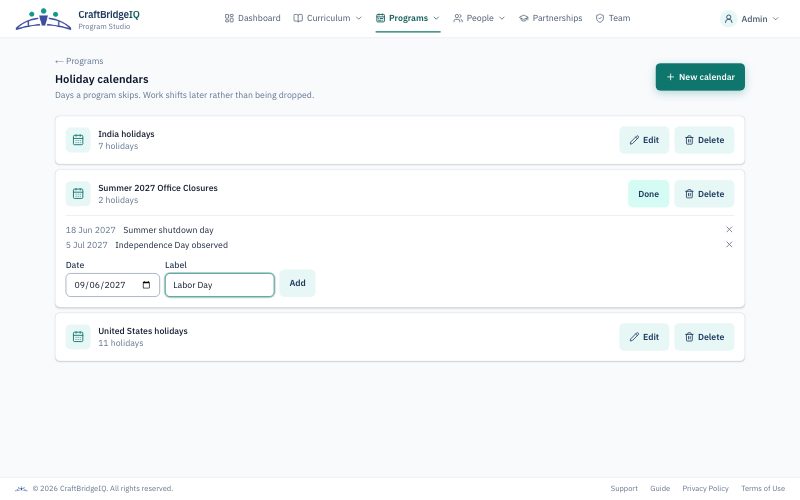
| No. | Control | What it does | What happens next |
|---|---|---|---|
| 1 | Done | Closes the holiday list. | The card goes back to its short form. |
| 2 | A holiday | Each holiday shows its date and its label, in date order. | Nothing; it is a label. |
| 3 | Remove Summer shutdown day | The X at the end of a holiday row. Removes that holiday straight away, with no confirmation. | The count on the card goes down by one. |
| 4 | Date | The date of the new holiday. | Needed before Add works. |
| 5 | Label | The name of the new holiday, for example Independence Day. | Needed before Add works. |
| 6 | Add | Adds the holiday to this calendar. Disabled until both fields are filled, and while a change is being saved. | The holiday appears in the list and the fields clear. |
Press New calendar and this box opens:
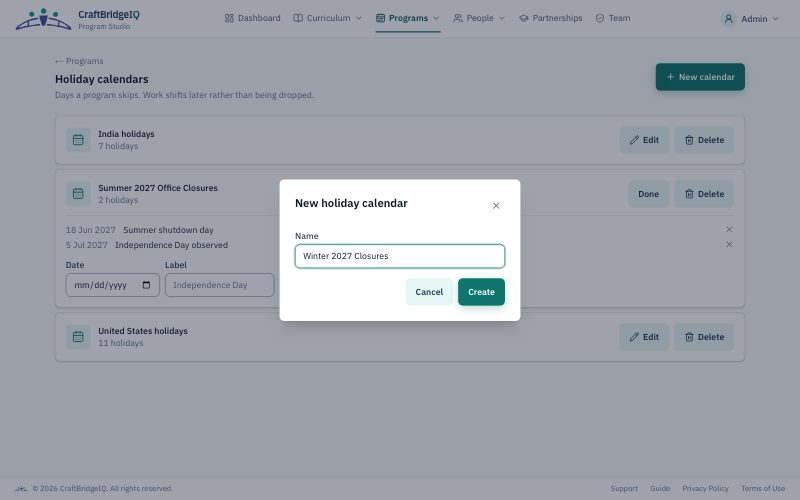
| No. | Control | What it does | What happens next |
|---|---|---|---|
| 1 | New holiday calendar | The title of the box. | Nothing; it is a label. |
| 2 | Name | The calendar's name, for example US Federal Holidays 2026. | Needed before Create works. |
| 3 | Cancel | Closes the box and creates nothing. | You are back on the list. |
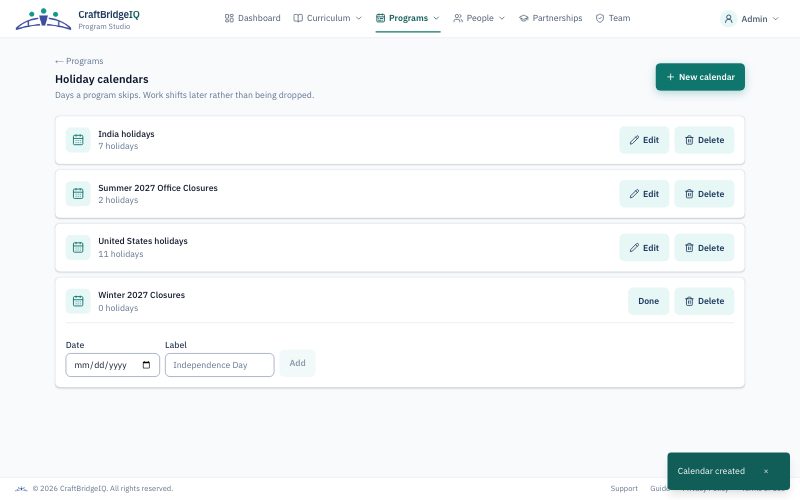
| 4 | Create | Creates an empty calendar. It reads Creating… while it works. Disabled while the name is blank. | A confirmation appears and the new calendar opens, ready for holidays. |
A new calendar opens straight away with an empty list, and a short confirmation appears at the bottom of the screen:
The box also has an X in its corner, labelled Close (from the shared box, see Invite and reset links).
Step by step
Create a calendar
- Open Programs, then Holiday calendars.
- Press New calendar.
- Type a name in Name.
- Press Create.
The new calendar opens with no holidays. Add them next.
Add a holiday
- Press Edit on the calendar. If you just created it, it is already open.
- Choose the date in Date.
- Type the name of the holiday in Label.
- Press Add.
Holidays are listed in date order.
Remove a holiday
- Press Edit on the calendar.
- Press the X at the end of the holiday’s row.
The holiday is removed at once. Add it again if it was a mistake.
Delete a calendar
- Press Delete on the calendar.
- Read the question your browser shows, then confirm.
Make a program use a calendar
- Open Programs and open a draft program.
- Find Schedule settings and choose the calendar in Holiday calendar.
- Press Update.
The schedule and the end date are recalculated. You can only change the calendar while the program is a draft. See One program.
The calendar and holiday fields
| Field | Required | Rules | Example |
|---|---|---|---|
| Name | Yes | Up to 200 characters. Blank is refused. | Summer 2027 Office Closures |
| Date | Yes | A real calendar date. Each date can be in a calendar once. | 2027-07-05 |
| Label | Yes | Up to 200 characters. Blank, or only spaces, is refused. | Independence Day observed |
Messages you can see
| Message | When you see it | What to do |
|---|---|---|
| Calendar created | After Create works. | Add the holidays. |
| Calendar deleted | After you confirm Delete and it succeeds. | Nothing. |
| Delete "Winter 2027 Closures"? | Your browser's own question when you press Delete. | Confirm, or cancel to keep the calendar. |
| Point those programs at a different calendar first. | Delete is refused because programs still use the calendar. The message starts with the calendar's internal code and says how many programs use it. | Switch those programs to another calendar, then delete. |
| Couldn't create that calendar. | Create fails and the server gives no reason. | Try again. |
| Couldn't update that calendar. | Adding or removing a holiday fails and the server gives no reason. | Try again. |
| Couldn't delete that calendar. | Delete fails and the server gives no reason. | Try again. |
| Couldn't load holiday calendars. | The list failed to load. | Press the retry button shown with it. |
| No holiday calendars yet | In place of the list when there are none. It adds that a program without one runs straight through every weekday. | Press New calendar. |
| This account can view but not change data. | A support login tries to change a calendar. | Ask an administrator. |
Limits and other roles
- A name and a holiday label can each be up to 200 characters.
- A calendar holds up to 1000 holidays.
- A calendar cannot have two holidays on the same date.
- A program can switch calendar but cannot go back to none once one is set, and only while it is a draft.
Common questions
Does a holiday remove work from the program?
No. Work moves later instead of being dropped, so the end date moves later. That is the sentence under the page heading: Work shifts later rather than being dropped.
Can I take a calendar off a program?
No. The program page says a calendar can be switched but not removed once set.
Can I change the calendar of a running program?
No. Once a program is active its calendar is read-only, because it was applied when the program was activated. Changing the holidays inside a calendar does not change programs that already started either.
Can I create a calendar from a program?
Yes. A draft program’s Schedule settings has a New calendar button next to a Manage calendars link that opens this page.
Last checked 2026-11-03 against the product.